 Tormano
The CRM built around QuickBooks
Your pipeline and your books, finally on the same screenYour donors and your books, finally on the same screen
The CRM built around QuickBooks: two-way sync, revenue recognition and collections built in, AI included. From $29 a seat, no onboarding fees.
The nonprofit CRM built around QuickBooks: donations, grants, volunteers, and events on top of your books. From $49 a month for unlimited users, no onboarding fees.
Catering contract
Quillon Row Bakery
$4,800
Proposal sent Won| Type | Customer | Amount |
|---|---|---|
| No invoice for this deal yet | ||
| Invoice | Quillon Row Bakery | $4,800.00 |
Press Mark as won to see what reaches QuickBooks.
Syncing
Invoice created in QuickBooks
With automatic invoicing for won deals on, a won deal becomes an invoice in QuickBooks. Earlier pipeline stages stay in Tormano unless you set an Estimate stage.
Sample data for illustration. Shown with QuickBooks Online. QuickBooks Desktop connects through Intuit's Web Connector on the schedule you set.
One time gift
- Donor
- Maria Alvarez
- Amount
- $250.00
- Fund
- Food Pantry
| Type | Customer | Amount |
|---|---|---|
| No sales receipt for this gift yet | ||
| Sales receipt | Maria AlvarezFund: Food Pantry | $250.00 |
Press Record gift to see what reaches QuickBooks.
Syncing
Sales receipt created in QuickBooks
A recorded donation becomes a sales receipt in QuickBooks, with its fund.
Sample data for illustration. Shown with QuickBooks Online. QuickBooks Desktop connects through Intuit's Web Connector on the schedule you set.
Quillon Row Bakery
- orders@quillonrow.example
- Phone
- (555) 010-0142(555) 010-0177
Quillon Row Bakery
- Phone
- (555) 010-0142(555) 010-0177
Press Change the phone number to see what reaches Tormano.
Syncing
Phone number updated in Tormano
When a matched customer changes in QuickBooks Online, Tormano updates the contact. Field locks and your conflict rule decide which side wins.
Sample data for illustration. Shown with QuickBooks Online. QuickBooks Desktop connects through Intuit's Web Connector on the schedule you set.
Maria Alvarez
- maria@example.org
- Phone
- (555) 010-0163(555) 010-0188
Maria Alvarez
- Phone
- (555) 010-0163(555) 010-0188
Press Change the phone number to see what reaches Tormano.
Syncing
Phone number updated in Tormano
When a matched customer changes in QuickBooks Online, Tormano updates the donor. Field locks and your conflict rule decide which side wins.
Sample data for illustration. Shown with QuickBooks Online. QuickBooks Desktop connects through Intuit's Web Connector on the schedule you set.
One record, two systems
With automatic invoicing for won deals on, mark a deal as won in Tormano and its invoice appears in your QuickBooks company. Change a customer in QuickBooks Online and the contact updates in Tormano.
Record a gift in Tormano and its sales receipt, with the fund, appears in your QuickBooks company. Change a customer in QuickBooks Online and the donor updates in Tormano.
- Tormano to QuickBooks Online
- A deal marked won creates its invoice once you turn on automatic invoicing for won deals, and a recorded donation creates its sales receipt as soon as it is saved. Other records follow the scheduled sync, which you switch on, from every 15 minutes to once a day.
- QuickBooks Online to Tormano
- Changes made in QuickBooks Online reach Tormano as they happen, with an hourly catch-up. Field locks and your conflict rule decide which side wins.
- QuickBooks Desktop
- QuickBooks Desktop connects through Intuit's Web Connector on the schedule you set, one way, from Tormano to Desktop.
Everything in one workspace
Fundraising and finance in one workspace
Swipe for more
Screens show sample data.
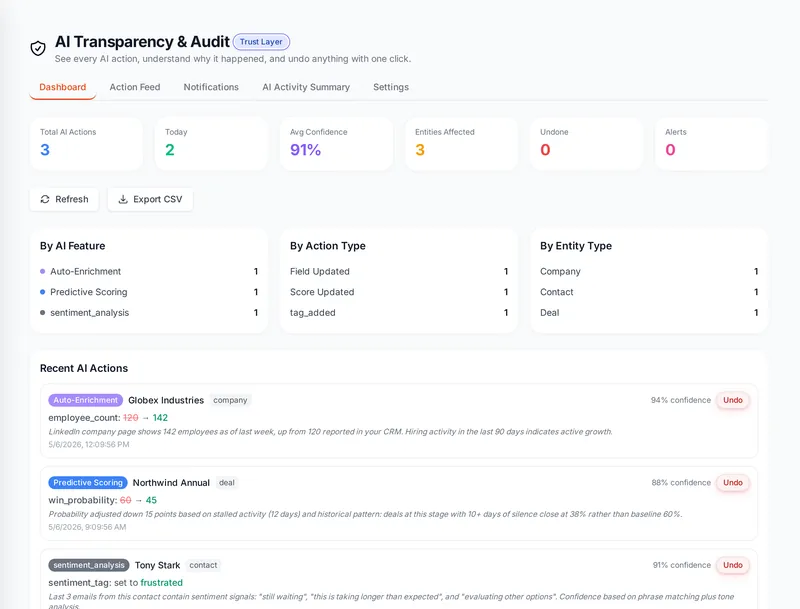
AI that shows its work
Every AI action is logged with its reasoning, its confidence, and a one-click undo.
- Reasoning you can readEach AI change keeps the old value, the new value and the reason for it.
- Confidence on every actionA confidence score sits beside each change, so you know which ones to check first.
- Undo in one clickIf the AI gets one wrong, press Undo and the original value comes back.
Lead scoring and auto-enrichment are included on every plan. The full AI suite is on the Business plan.
Donor scoring and auto-enrichment are included on every plan. The full AI suite is on the Professional plan.
How it works
No onboarding consultant, no setup project. Three steps and you are live.
-
Step 1
Connect QuickBooks
Sign in with QuickBooks Online to start syncing customers, invoices, and items, or connect QuickBooks Desktop through Intuit's Web Connector.
Sign in with QuickBooks Online to start syncing funds, donors, and grant accounts, or connect QuickBooks Desktop through Intuit's Web Connector.
-
Step 2
Import your contactsImport your donors
Drop in a CSV, or start from a prebuilt template for HubSpot, Salesforce, Pipedrive, or Zoho. Deduplication runs automatically as records land.
Drop in a CSV, or start from a prebuilt template for Bloomerang, DonorPerfect, Neon CRM, Little Green Light, and more. Deduplication runs automatically.
-
Step 3
Run your pipelineRun your campaigns
Drag deals across stages on day one. Reporting and lead scoring are already on.
Send your first acknowledgement, schedule a volunteer shift, or draft a grant on day one. Reporting and donor scoring are already on.
Swipe for more
Take the five step tour
-
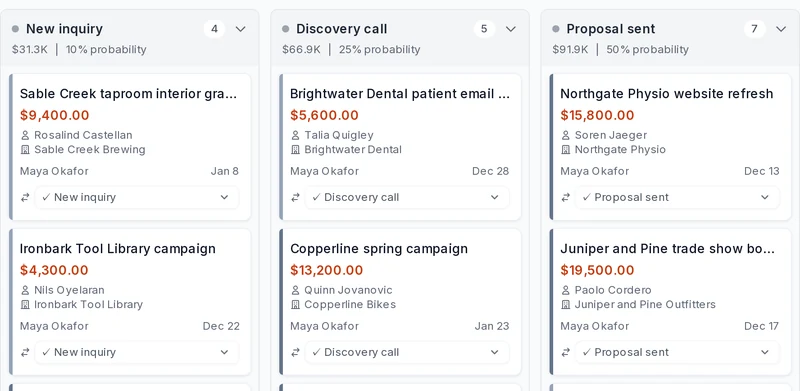
Pipeline board Every stage shows its deal count, total value and win probability, so the whole pipeline reads at a glance. -
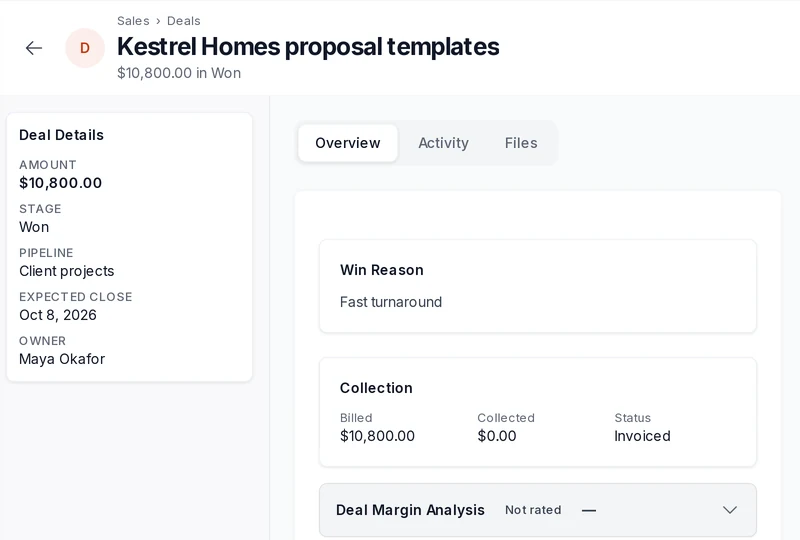
Deal record A won deal records what was billed, what was collected and where the invoice stands. -
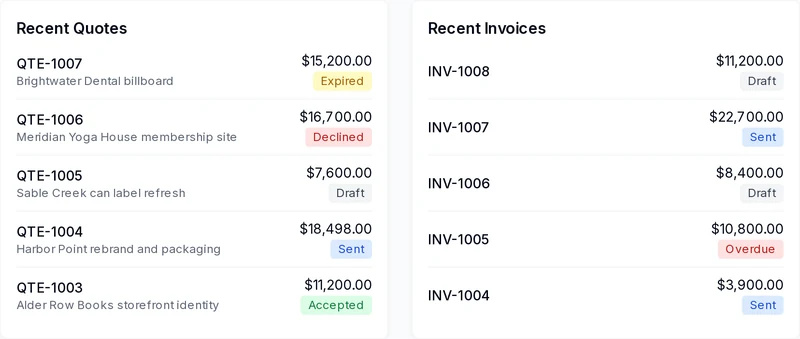
Quotes and invoices Each quote and invoice carries a status tag, such as Draft, Sent, Accepted or Overdue. -
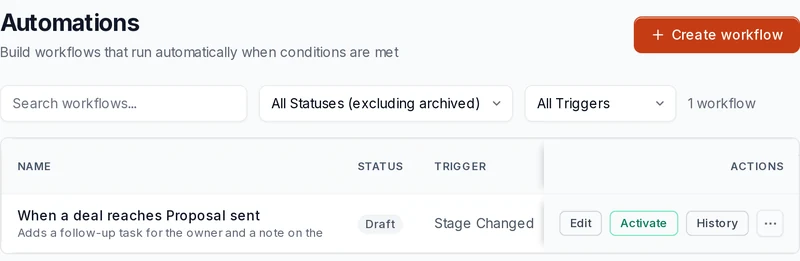
Automation A rule starts from a trigger, here a deal reaching Proposal sent, and adds follow up work for the owner. -
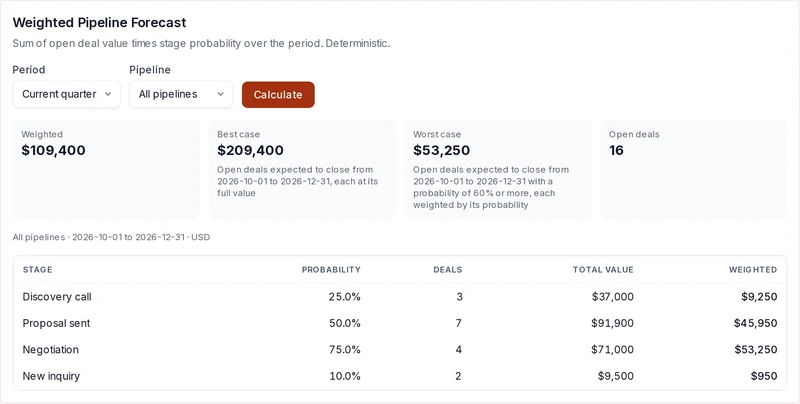
Forecast Forecasting weighs open deals by stage probability and shows the best case and the worst case.
Take the five step tour
-
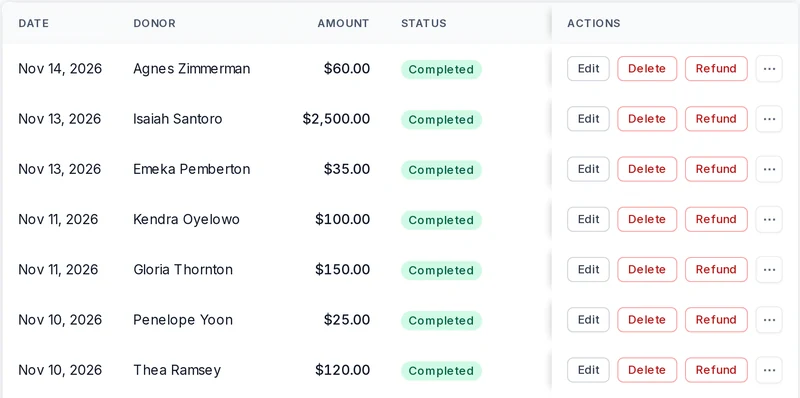
Gifts Every gift is a row with its date, donor, amount and status. -
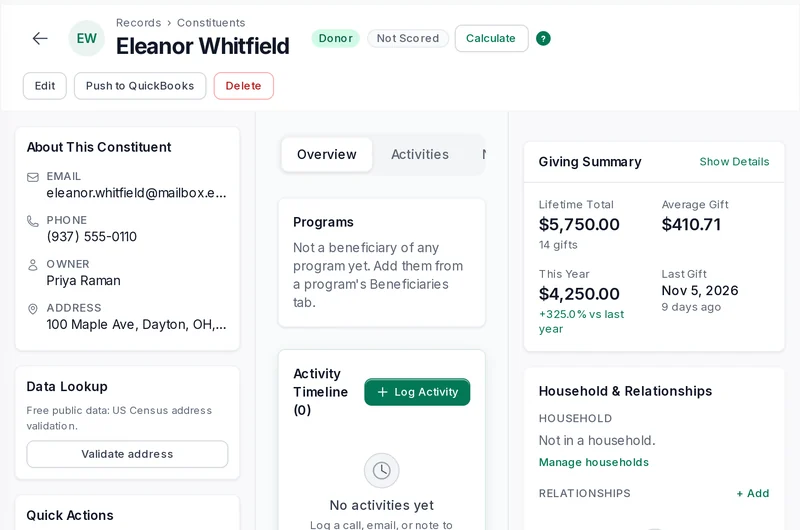
Donor giving history A donor's record keeps lifetime giving, average gift, this year and last gift in one card. -
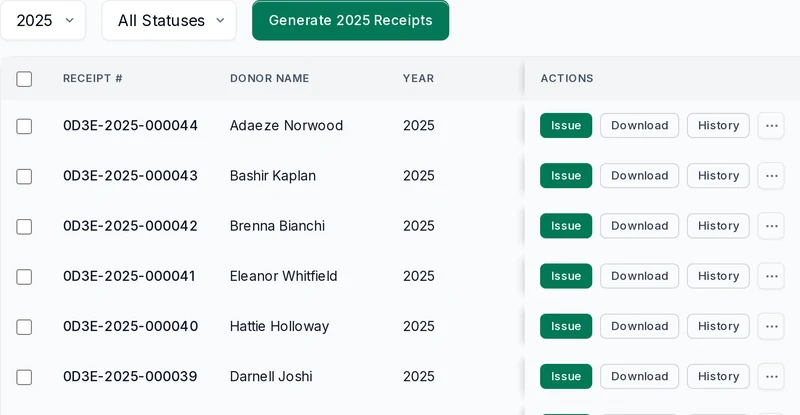
Tax receipts Generate the year's receipts in one step, then issue, download or review the history of each. -
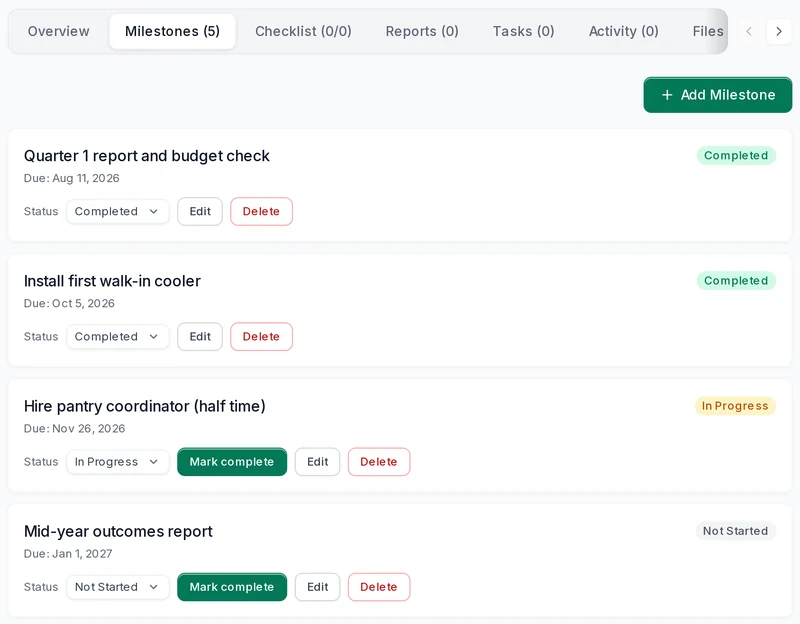
Grant milestones Each grant tracks its milestones with a due date and a status. -
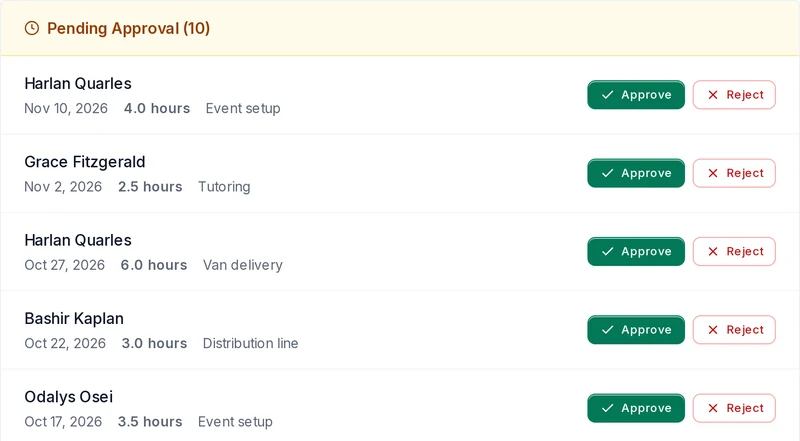
Volunteer hours Volunteer hours wait for approval, with Approve and Reject beside every entry.
Straightforward pricing
Every plan includes QuickBooks sync, scoring, and enrichment. No onboarding fees, and the 14-day free trial needs no credit card.
-
Essentials
$29per seat per month, billed annually. $35 billed monthly.
Core CRM for small sales teams.
-
Growth
$59per seat per month, billed annually. $69 billed monthly.
Full-featured CRM for growing teams.
-
Business
$99per seat per month, billed annually. $119 billed monthly.
Premium CRM with the full AI suite and full QuickBooks depth.
Swipe for more
-
Starter
$49per month, billed annually, unlimited users. $59 billed monthly.
Essential nonprofit CRM for a small team.
-
Standard
$99per month, billed annually, unlimited users. $119 billed monthly.
Full-featured nonprofit CRM for a growing team.
-
Professional
$249per month, billed annually, unlimited users. $299 billed monthly.
Premium nonprofit CRM with the full AI suite.
Swipe for more
Card payments taken through Tormano add a 0.25% platform fee on top of Stripe's standard 2.9% + 30¢ per card charge, about 3.15% + 30¢ all in. Payments you record by hand carry no platform fee. ACH and international cards are priced differently by Stripe. See all fees.
Online gifts taken through Tormano add a 2% platform fee on top of Stripe's standard 2.9% + 30¢ per card charge, about 4.9% + 30¢ all in. Gifts you record by hand carry no platform fee. ACH and international cards are priced differently by Stripe. See all fees.
See full pricingCompare Tormano against the CRM you use today
Compare Tormano against the donor database you use today
Starting price per seat, side by side, from published vendor pricing.
Starting price per month, side by side, from published vendor pricing.
- TormanoFrom $29per seat a month, billed annuallySee pricing
- HubSpot Sales Hub$7 to $20per seat a month for Starter, plus a free tierFull comparison
- Salesforce$25per seat a month (Starter Suite)Full comparison
- Pipedrive$14per seat a month (Lite)Full comparison
- Method CRM$35per seat a month (Quick Start)Full comparison
- TormanoFrom $49a month, flat rate, unlimited usersSee pricing
- BloomerangFrom $125a month, scaled by record countFull comparison
- VirtuousOn requestPricing is requested from the vendorFull comparison
- Neon CRMFrom $99a month, scaled by organization revenueFull comparison
Swipe for more
Tormano has no onboarding fee on any plan. HubSpot lists required onboarding fees of $1,500 (Professional) and $3,500 (Enterprise). Competitor pricing as publicly listed, November 2026.
Tormano has no onboarding fee on any plan, and volunteer management is included from Standard. Bloomerang sells volunteer management as a separate product from $119 a month. Competitor pricing as publicly listed, November 2026.
See all comparisonsWhat you can count on
-
Pricing
No onboarding fee
No setup fee either, on any plan. The price on the pricing page is the price.
-
Business plans
Pay per seat
Plans are priced per seat per month. Add or remove seats at any time and your invoice prorates automatically.
-
Nonprofit plans
Flat price, unlimited users
Every nonprofit plan is flat-rate with unlimited users, so nobody on your team is rationed a login.
-
Payments
Funds land in your Stripe account
Online payments settle into your organization's own Stripe account. Tormano never holds your money.
-
Records
Audit trail on every plan
The audit log is append-only. The application has no way to change an entry, and the database rejects changes to existing entries, so tampering would be evident.
-
Availability
A public status page
Live availability, uptime history and the incident record are public on our status page.
Swipe for more
Common questions
How does the free trial work?
Every plan starts with a 14-day free trial, every feature of the selected plan unlocked for the duration of the trial period, no credit card required. There is no card at sign-up, no automatic charge, and nothing to cancel. When the 14 days are up your workspace is paused until you choose a plan, and your data is kept for 90 days after the pause, then deleted. Add a card any time to carry on.
How does the QuickBooks sync work?
It is two-way with QuickBooks Online. A deal marked won creates its QuickBooks invoice once you turn on automatic invoicing for won deals, and a recorded donation creates its sales receipt as soon as it is saved. Nine QuickBooks record types change data in Tormano when they change in QuickBooks Online (customer, invoice, payment, sales receipt, credit memo, refund receipt, estimate, vendor and purchase): they arrive as they happen, with an hourly catch-up for customers, invoices, payments and sales receipts. Other records go to QuickBooks on the scheduled sync, which you switch on, from every 15 minutes to once a day. QuickBooks Desktop connects through Intuit's Web Connector on the schedule you set, one way, from Tormano to Desktop. Sync is on every plan and the full depth is on the top plan. See how the QuickBooks integration works.
What does it cost to accept payments or donations?
Our platform fee is 0.25% on business payments and 2% on online donations. Money settles into your organization's own Stripe account, so you also pay Stripe's standard rate of 2.9% + 30¢ per card charge: about 3.15% + 30¢ all in on a payment, about 4.9% + 30¢ on a gift. Anything you record by hand is free.
Can I import from what I use today?
Yes. Prebuilt templates map the export columns of 11 platforms for you, including HubSpot, Salesforce, Zoho, Pipedrive, Bloomerang, DonorPerfect, and Little Green Light. Using something else, Raiser's Edge included? Import a CSV and Tormano matches the common columns on its own, so you map the rest once. Deduplication runs as records land.
How do I export my data if I leave?
Yes. You own your data. While your workspace is active you can export it with the export tools in the app, and the plans that include data compliance can export the whole workspace. If you leave, your workspace is paused, you can still sign in and download your main lists as CSV files, and your data is kept for 90 days after the pause, then deleted. For a full copy of your data, email support@tormano.com and we reply within 2 business days.
One CRM, one ledger
One donor view, one ledger
Connect QuickBooks, import your contacts, and run your own pipeline in Tormano from $29 a seat.
Connect QuickBooks, import your donors, and run your own fundraising in Tormano from $49 a month.
14 days, every feature of the selected plan unlocked, no credit card required.