 Tormano
Reporting your team will use
Build the report you need in front of a live chart, or describe it in plain language and watch it appear. Dashboards filter every widget at once, and your QuickBooks financials sit beside your pipeline instead of in another tab.
Report Studio: build by looking, not guessing
Pick the records you want to look at (contacts, companies, deals, activities, campaigns, donations, pledges, grants, events, volunteers, memberships) and shape the question in front of a chart that redraws on every change. Count, sum or average any field, including your own custom fields, group it by day, week, month, quarter or year, and split it by a second field when one line is not the whole story.
Filters understand your custom fields, and Top N with sorting keeps leaderboards tight. Templates for your kind of organization, from pipeline by stage to giving by fund and average gift size, give you a starting point instead of a blank canvas. Every number is calculated over all of your records, never a sample.
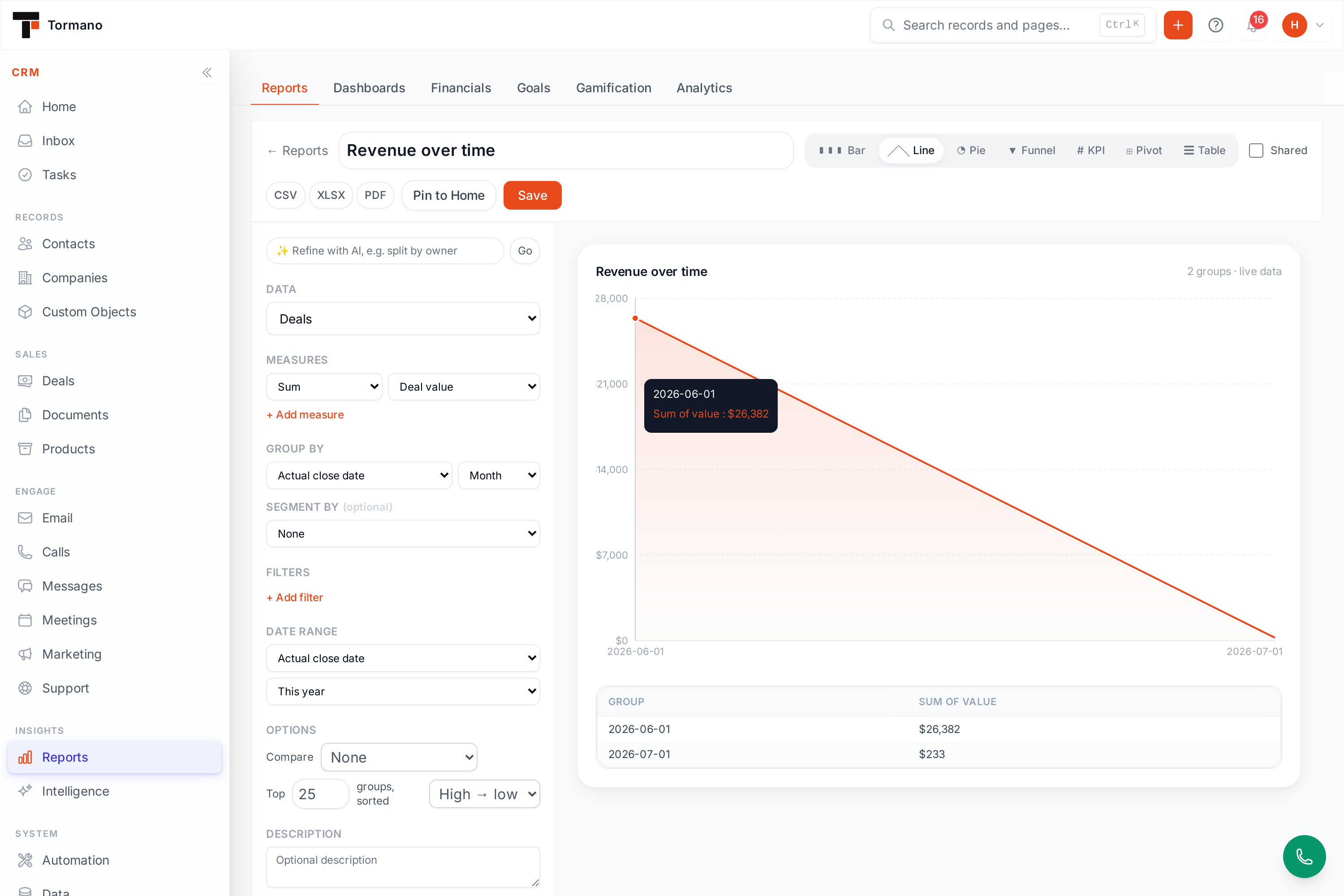
Describe the report and the AI builds it
Type “total donations by fund this year as a bar chart” and Report Studio assembles it. The AI works only with the fields you already have, so it cannot invent a column. Refine it the same way: “split it by owner”, “make it a pie”, “compare to last year”. Every step lands as an editable report you can open, adjust and save.
Drill, pivot, and compare
Time-series reports overlay the previous period or previous year as a second line, so period-over-period reads take no setup. Click any bar, slice or point to drill in and the report narrows to that group or date range rather than just zooming the chart. A pivot view turns any report into a rows-by-columns matrix with row, column and grand totals.
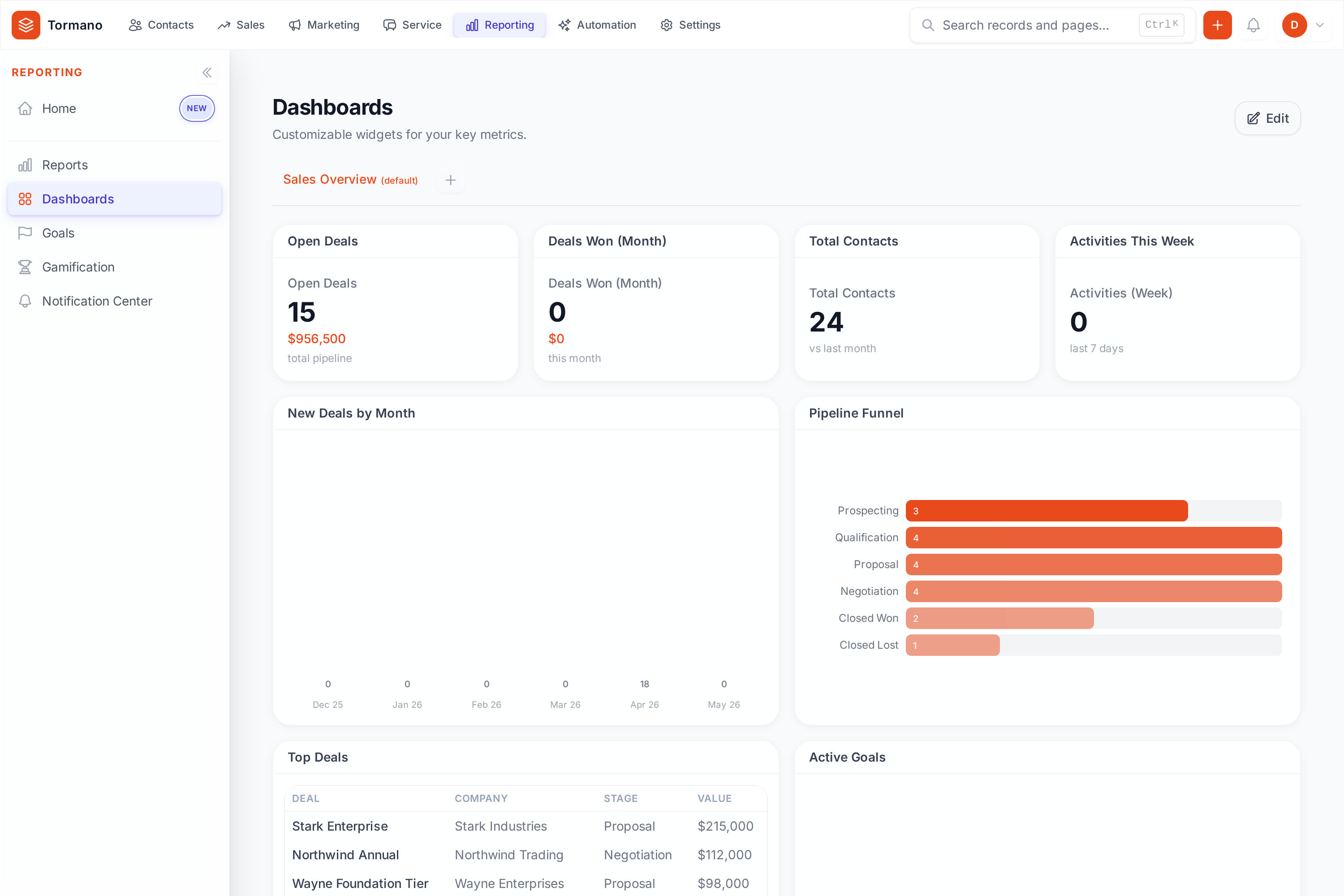
Dashboards with one filter for every widget
Dashboards are drag-and-drop grids of live widgets: KPI cards, interactive charts with tooltips and legends, pipeline funnels, tables, goal trackers, and QuickBooks financial widgets that put revenue year to date, receivables and revenue trend beside your pipeline.
One date and owner filter applies to every widget at once, and a widget the filter cannot apply to tells you so instead of quietly ignoring it. A dashboard stays private until you share it with your team.
Scheduled delivery
Email any report daily, weekly or monthly as PDF, Excel or CSV, with a delivery log that records what went out and to whom. On-demand exports use the same three formats.
Financials from the ledger
P&L, balance sheet, cash flow, aging and more, straight from QuickBooks, plus revenue by campaign or fund and per-project profitability. New to revenue recognition? Start with our plain-language ASC 606 guide.
Nonprofit analytics, built in
Lapsed-donor lists (LYBUNT and SYBUNT), donor retention, the giving pyramid, campaign performance and pledge summaries, scoped by fund and campaign and sent monthly to whoever needs them.
Sales analytics, built in
Pipeline conversion, deal velocity, stage duration and win rates, three ways to forecast, and margin analysis built from the cost data already in QuickBooks.
How teams use it
The Monday pipeline review
A sales manager opens one dashboard filtered to this quarter: pipeline by stage, deals aging past their stage average and revenue trend from QuickBooks. One screen instead of four exports.
The Monday fundraising review
A development director opens one dashboard filtered to this quarter: giving by fund, pledges still outstanding and revenue trend from QuickBooks. One screen instead of four exports.
The monthly board number
A sales manager saves a pipeline report scoped to this quarter once, schedules it monthly as a PDF, and stops rebuilding the same slide before every meeting.
The monthly board number
A development director saves a lapsed-donor report scoped to the annual fund once, schedules it monthly as a PDF, and spends the recovered hours calling the donors it lists.
The finance cross-check
A fractional CFO pins revenue year to date and receivables from QuickBooks next to weighted pipeline, and sees it early when sales expectations and cash drift apart.
The finance cross-check
A finance lead pins revenue year to date and receivables from QuickBooks next to giving by fund, and sees it early when the fundraising plan and cash drift apart.
Saved once, useful forever
Save any report with its configuration and re-run it on demand, export it, schedule it, or pin it to your home page as a live widget, so the report you shaped carefully in March still answers the same question in November. Reports respect your permissions: a rep who only sees their own records only sees their own numbers. And reports read your live records, never a delayed copy.
More features: automation and AI, the nonprofit suite, and the QuickBooks integration. Or compare Tormano with HubSpot, Salesforce and QuickBooks.
Common questions
Do reports run on my full data or a sample?
Full data, always. Every number is calculated over all of your records, never a sample. Result tables paginate so they are readable on screen, but the totals behind them are complete.
Can I report on custom fields?
Yes. Any custom field you define on contacts, companies, deals or donations is available in Report Studio as a column, a filter, a grouping, and, for numeric fields, a measure you can count, sum or average.
What export formats are supported?
CSV, Excel and PDF, on demand or on a schedule. The scheduled email attaches the format you chose, and the delivery log records what was sent, when, and to whom.
Who can see a dashboard I build?
Only you, unless you share it. Dashboards are private by default and become visible to teammates when you share them with your organization.
Which plans include AI report generation?
AI report generation comes with the full AI suite, which is on Business for businesses and Professional for nonprofits. Custom reports and dashboards are included from Growth (business) and Standard (nonprofit) upward. The pricing table lists every plan line by line.
See it with your own data
Connect QuickBooks, import your records, and run your own reports from day one.
14-day free trial. Every feature unlocked. No credit card required.