Home › Features › Nonprofit suite

Nonprofit suite

A nonprofit CRM that speaks fundraising and accounting

Tormano Nonprofit is a CRM for organizations that use QuickBooks for their books. Donations, pledges, grants, volunteers and events share one record, and every plan has unlimited users from $49 a month billed annually.

Tormano, gift

One time gift

Donor
Maria Alvarez
Amount
$250.00
Fund
Food Pantry
New gift Recorded
Your QuickBooks company, sales receipts
Sales receipts in your QuickBooks company
TypeCustomerAmount
No sales receipt for this gift yet
Sales receiptMaria AlvarezFund: Food Pantry$250.00

Sales receipt created in QuickBooks

A recorded donation becomes a sales receipt in QuickBooks, with its fund.

Sample data for illustration. Shown with QuickBooks Online. QuickBooks Desktop connects through Intuit's Web Connector on the schedule you set.

Tormano, donor

Maria Alvarez

Email
maria@example.org
Phone
(555) 010-0163(555) 010-0188
Matched to a QuickBooks customer Updated from QuickBooks
Your QuickBooks company, customer

Maria Alvarez

Phone
(555) 010-0163(555) 010-0188

Phone number updated in Tormano

When a matched customer changes in QuickBooks Online, Tormano updates the donor. Field locks and your conflict rule decide which side wins.

Sample data for illustration. Shown with QuickBooks Online. QuickBooks Desktop connects through Intuit's Web Connector on the schedule you set.

What is inside Tormano Nonprofit

Gifts, donors, receipts, grants, volunteers and funds share one record, so a volunteer who becomes a donor is one story.

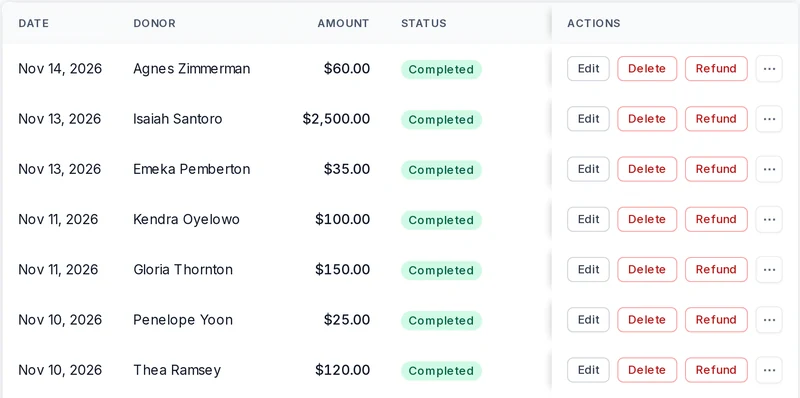
A table of seven recent donations with columns for date, donor, amount, status and actions. Each row is a different donor, amounts run from $25.00 to $2,500.00, every status reads Completed, and each row has Edit, Delete and Refund buttons.
Seven recent gifts from seven different donors, each with its status and actions. Sample data.
Gifts

Every kind of gift, in one place

One-time gifts, pledges with payment schedules, and monthly donors on Stripe whose failed cards are retried and followed up automatically. Donation forms that show only the questions that apply embed anywhere, peer-to-peer pages let supporters raise on your behalf, and campaign attribution shows which appeal brought the money in.

What you keep from each gift
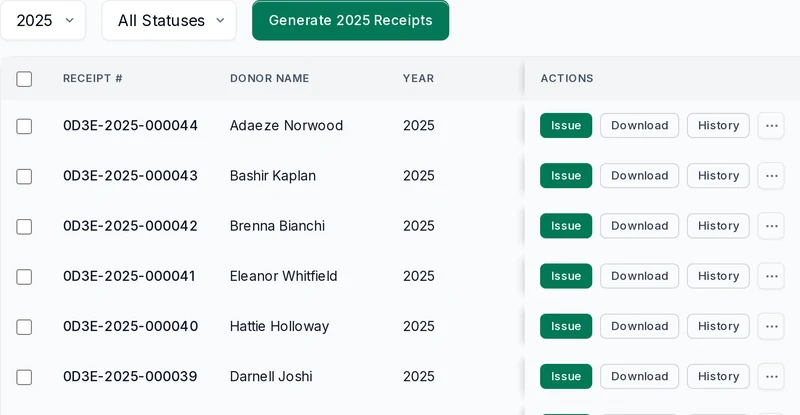
A tax receipts list for 2025 with a year picker, a status filter and a Generate 2025 Receipts button, above rows of numbered receipts with donor names, each row offering Issue, Download and History.
The 2025 receipts list, ready to generate and issue in a batch. Sample data.
Tax receipts, on every plan

IRS and CRA tax receipts

Individual receipts and year-end statements with 501(c)(3) language and quid-pro-quo disclosures. Generate, email, void or reissue receipts in batches; every receipt is numbered and logged.

New to the rules? Read what the IRS requires
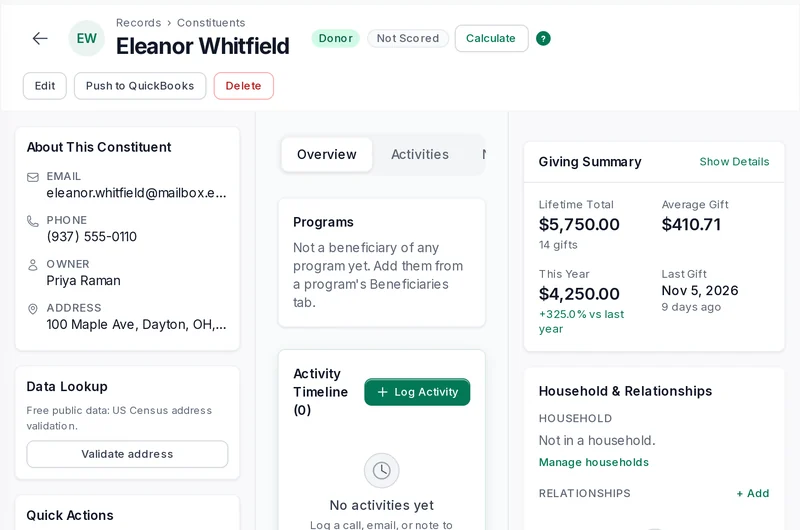
A donor record tagged Donor, with an About card, a Programs card and an activity timeline, and a Giving Summary card showing a lifetime total of $5,750.00 over 14 gifts, an average gift of $410.71, $4,250.00 this year and a last gift on Nov 5, 2026. Edit, Push to QuickBooks and Delete buttons sit at the top.
One donor record with lifetime giving, average gift and last gift. Sample data.
Donors

Donor records with giving history

Every donor record shows lifetime giving, gift count, average gift and last gift, with households and relationships beside it. On Standard and Professional, donors also get a self-service portal with their giving history, receipt downloads and control of their own recurring gift, which removes a whole category of “can you resend that receipt” email.

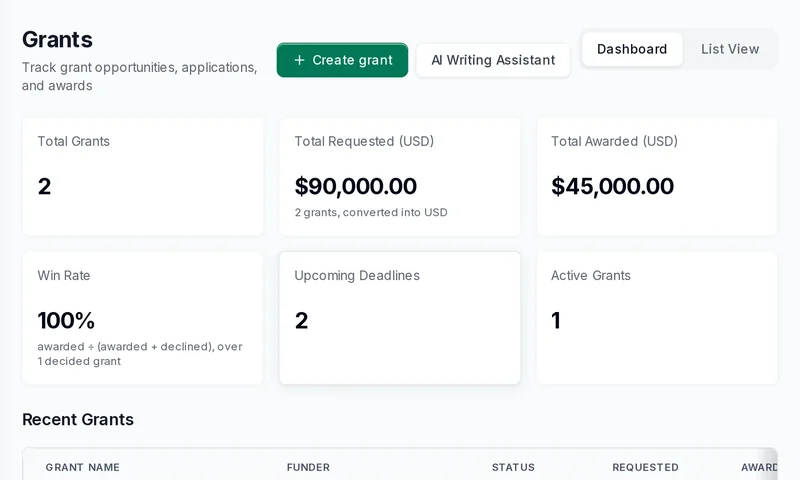
The Grants page in dashboard view, with six tiles: 2 total grants, $90,000.00 requested, $45,000.00 awarded, a 100% win rate, 2 upcoming deadlines and 1 active grant.
The grants dashboard, with requested and awarded totals and upcoming deadlines. Sample data.
Grants

Grants, from prospect to report

A grant pipeline from prospect to closeout, with deadline tracking, milestones that carry their own due dates, and grant budget against actuals from your QuickBooks books. The AI grant writing assistant is on Professional: it drafts each section of an application in the tone you choose. You edit it, you own it, you submit it.

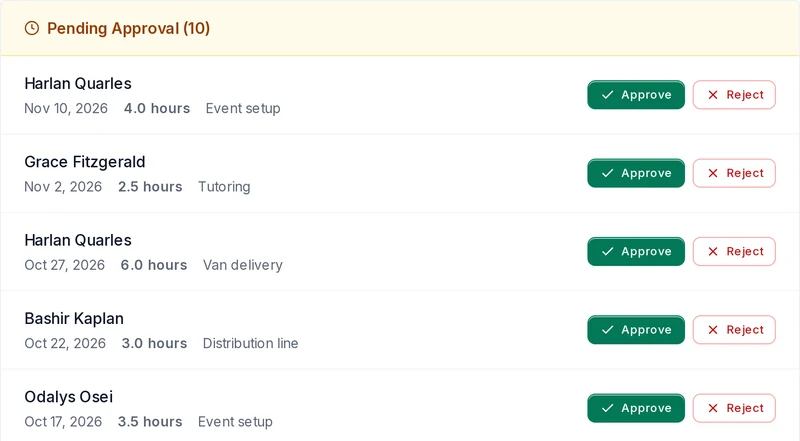
A Pending Approval list of ten volunteer hour entries, five of them visible, each with a volunteer name, a date, hours and a task such as event setup, tutoring or van delivery, and Approve and Reject buttons.
Volunteer hours waiting for a coordinator to approve. Sample data.
Volunteers

Volunteers who stay organized

A volunteer database on the same contact records as your giving: skills, availability, background-check tracking, shift scheduling with self-service signup, hour logging with approval, and notifications that reach the right coordinator for the right signups. Scheduling starts on Standard.

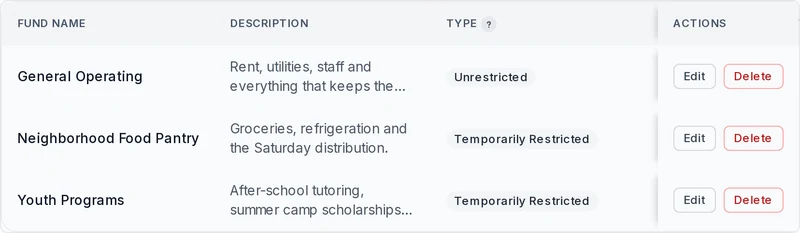
A table of three funds: General Operating, marked Unrestricted, and Neighborhood Food Pantry and Youth Programs, both marked Temporarily Restricted, each with a short description and Edit and Delete buttons.
Three funds, with the restriction type of each. Sample data.
Funds

Funds and restricted giving

Multi-fund and restriction tracking follows every dollar. Each fund tags its donations to a QuickBooks income account or class, so restriction reporting can come straight off the ledger.

Swipe for more

Also in the suite

Events with registration tracking

Galas, fundraisers and community events: registrations recorded, seats capped with a waitlist for overflow, attendees checked in at the door, and revenue landing on the donor record. Eventbrite registrations arrive as contacts.

Donor intelligence

Free research across public IRS Form 990 filings, with a link back to the original filing on every result. Donor scoring and lapsing-donor alerts tell you who to call next.

Households and relationships

Group contacts into households with combined giving, link spouses, employers, board members and more, and keep giving statements one click away.

Programs and outcomes

Track programs and projects with beneficiaries and outcome measurement, so the impact story sits beside the giving story. Memberships with tiers and renewals live here too (from Standard).

Communications

Email campaigns with merge fields (from Standard), automated acknowledgments, and a workflow builder that sends the thank-you, books the receipt and schedules the follow-up in one motion.

Swipe for more

QuickBooks

The books stay true

Gifts, pledges and grants land in QuickBooks in the right place, and on QuickBooks Online your bookkeeper's changes come back to Tormano.

Tormano to QuickBooks

Gifts, pledges and grants post for you

Donations post as sales receipts, and each fund tags its donations to a QuickBooks income account or class. Pledges can post as invoices, with each payment applied as a draw-down. Grant income books against the grantor's customer record.

QuickBooks Online to Tormano

Corrections come back

On QuickBooks Online, a change made in QuickBooks reaches Tormano in real time. Nine record types change data in Tormano: customers, invoices, payments, sales receipts, credit memos, refund receipts, estimates, vendors and purchases. An hourly catch-up covers customers, invoices, payments and sales receipts if a connection drops. For customers, field locks and your conflict rule decide which side wins.

QuickBooks Desktop

One way, on a schedule

QuickBooks Desktop connects through Intuit's Web Connector on the schedule you set. It is one way: Tormano sends records to QuickBooks Desktop, and changes made in Desktop do not come back.

Swipe for more

Form 990 preparation data is calculated from the same records your development team already keeps. See how the QuickBooks sync works.

What you keep from each gift

What it costs to get paid

Tormano's platform fee on online giving is 2%

Donations settle into your organization's own Stripe account, so your organization also pays Stripe's standard processing rate of 2.9% + 30¢ per successful card charge. All in, a card gift costs about 4.9% + 30¢. On a $100 donation that is roughly $5.20 in total fees, leaving about $94.80 in your account.

  • No donor tips. Tormano giving forms carry no tip prompt and no suggested-tip default. The fee is paid by your organization, never asked of your donor.
  • Funds land in your own Stripe account. Tormano never holds your money.
  • No setup fee and no onboarding fee, on any plan.
Manual gifts, refunds, bank transfers and international cards
  • Gifts you record manually carry no platform fee.
  • Refund a gift and Tormano returns its platform fee in proportion to the refund.
  • Bank (ACH) and international cards are priced by Stripe at their own rates.
  • Stripe's other charges, such as dispute fees, currency conversion and instant payouts, are billed by Stripe to your organization.
What you keep

Try a gift amount

Shown for a $100 card gift.

Stripe's standard fee (2.9% + 30¢)
$3.20
Tormano's platform fee (2%)
$2.00
Total fees
$5.20
You keep
$94.80

Fees are 5.20% of the gift.

An estimate for a standard card charge at the rates on this page, rounded to the cent. Bank (ACH) and international cards are priced by Stripe at their own rates. Gifts you record manually carry no platform fee.

How organizations use it

Development

The two-person development team

A development director replaces a donor spreadsheet, a form tool and month-end re-typing. Gifts arrive receipted, acknowledged and on the ledger without anyone copying a number twice.

Programs

The volunteer-heavy program

A program manager folds a standalone volunteer scheduler into the CRM. Shifts, hours and approvals sit on the same records as giving, so a volunteer who becomes a donor is one story.

Grants

The grant-funded organization

A grants manager runs the pipeline and its deadlines, drafts applications with the AI assistant on Professional, compares grant budgets with actuals from QuickBooks, and hands the auditor restriction reporting that ties to the ledger.

Swipe for more

Bring your donors with you

Import templates

Prebuilt templates for the platforms nonprofits move from

  • Bloomerang
  • DonorPerfect
  • Little Green Light
  • Neon CRM
  • Fundly CRM (NonProfitEasy)
  • CiviCRM
  • Givebutter

Constituents and gifts map from each platform's CSV export. The import wizard shows a preview before anything is imported, finds matching donors by email first and then by name and phone, and lets you choose whether duplicates are skipped, updated or created as new. One file can carry donors and their gifts together.

A Salesforce template maps contacts and organizations. Moving from QuickBooks Desktop too? The migration checklist walks the whole path.

Every plan has unlimited users, so nobody has to ration logins. More features: reporting and dashboards, automation and AI, and the QuickBooks integration. Or compare Tormano with Bloomerang, Neon CRM and Little Green Light.

Common questions

Is there a per-user charge on nonprofit plans?

No. Every nonprofit plan is flat-rate with unlimited users, so development staff, volunteer coordinators, finance and board members all work from the same system without per-seat charges.

What does it cost to accept online donations?

Online donations run through your organization's own Stripe account. Your organization pays Stripe's 2.9% + 30¢ per successful card charge plus Tormano's 2% platform fee, about 4.9% + 30¢ all in. On a $100 card donation that is roughly $5.20 in fees, leaving about $94.80. ACH and international cards are priced differently by Stripe, and gifts you record by hand carry no platform fee. Online giving switches on once your Stripe account is connected.

Can we migrate from Bloomerang, DonorPerfect, or Little Green Light?

Yes, all three have a prebuilt import template, and so do Neon CRM, Fundly CRM (NonProfitEasy), CiviCRM and Givebutter. Constituents and gifts map from each platform's CSV export, you see a preview before anything is imported, and you choose whether duplicates are skipped, updated or created as new. One file can carry donors and their gifts together.

Does the public-filings research cost extra?

No. It draws on public IRS Form 990 filings via ProPublica, and every result links back to the original filing.

How deep is the QuickBooks integration for nonprofits?

On QuickBooks Online it is two-way. Donations post as sales receipts, pledges can post as invoices with each payment applied as a draw-down, each fund tags its donations to a QuickBooks income account or class for restriction reporting, grant income books to the grantor's customer record, and Form 990 preparation data is calculated from the same records. Going the other way, nine QuickBooks record types change data in Tormano when they change in QuickBooks Online (customers, invoices, payments, sales receipts, credit memos, refund receipts, estimates, vendors and purchases), in real time, with an hourly catch-up for customers, invoices, payments and sales receipts. QuickBooks Desktop connects through Intuit's Web Connector on the schedule you set, and it is one way, from Tormano to Desktop.

Which plans include what?

Tax receipts and the audit trail are on every nonprofit plan, along with donor scoring and enrichment. The donor portal, volunteer scheduling and memberships start on Standard. The full AI suite, including the grant writing assistant, is on Professional. Automations run five on Starter, 25 on Standard and unlimited on Professional. The pricing table lists every line.

See it with your own data

Connect QuickBooks, import your donors, and send your first receipt from day one.

14-day free trial. Every feature of the selected plan unlocked. No credit card required.