 Tormano
Home › Features › Automation and AI
Automation and AIAutomation with an audit trail
Build a workflow on a canvas, watch it fire the moment something changes, and see every step it took. Its actions reach into QuickBooks, and every change an AI agent makes is logged with its reasoning and undoable in one click.
The visual workflow builder
A drag-and-drop canvas where you branch on any condition, split a test two ways, run steps in parallel, stop early when a goal is met, and pause for days or weeks without losing your place. A workflow starts the moment a record is created or updated, a field or stage changes, an email is opened or clicked, a form is submitted, a date arrives, a schedule comes round, or someone runs it by hand.
Before anything goes live, test mode runs the workflow against a sample record and shows you, step by step, what would run, what would be skipped, and what still needs setting up. Nothing is sent and nothing is changed. Version history snapshots every save so you can roll back, and a run log records each execution and how it ended.
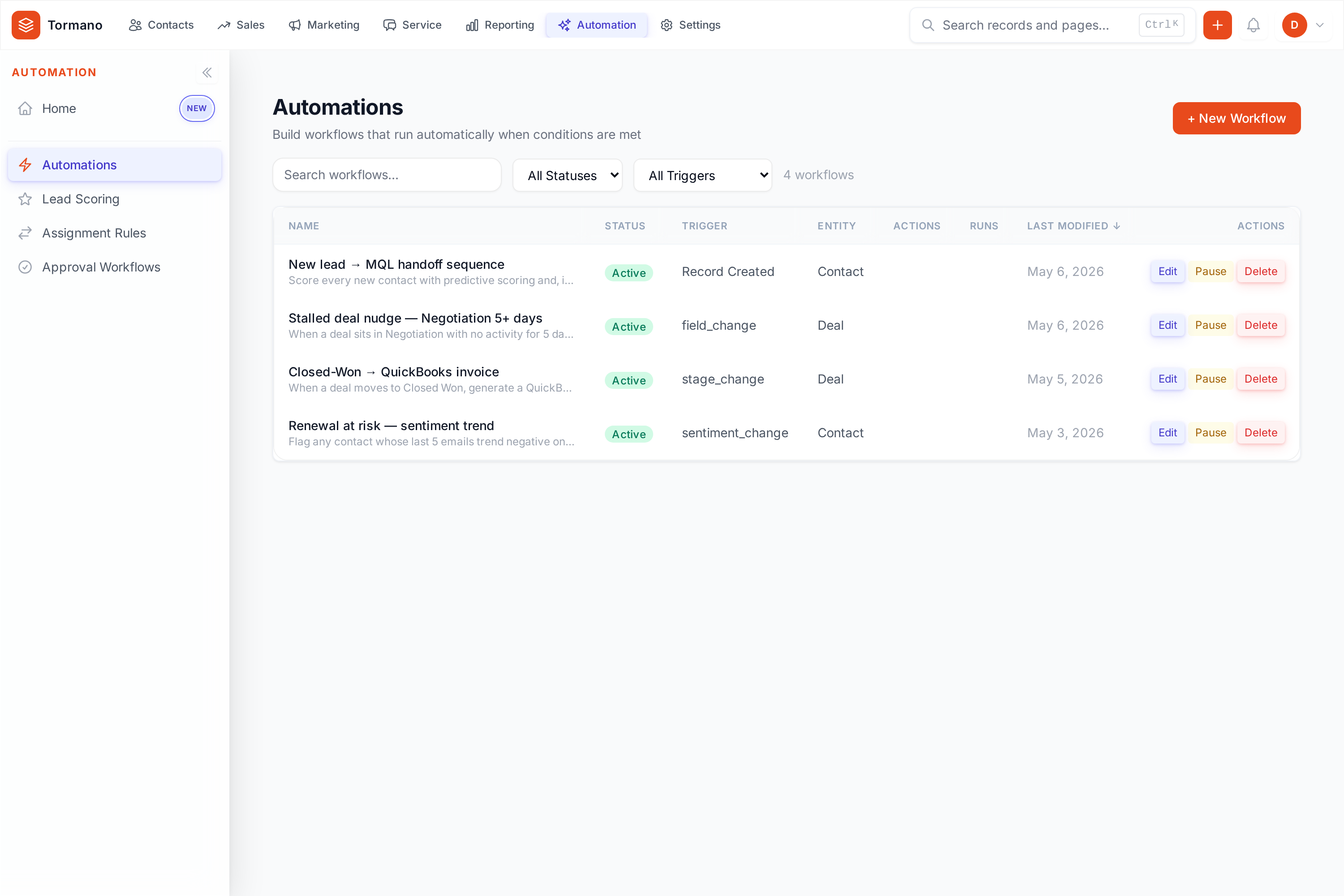
What a workflow can do
Send email, create tasks and activities, update fields, assign owners, manage tags and lists, move deal stages, enroll contacts in sequences, send data to another app, and create QuickBooks invoices, estimates or sales receipts straight from a workflow step. A won deal can invoice itself. Six ready-made workflows are there if you would rather not start from a blank canvas.
AI that shows its work
Every change an AI agent makes is logged with the old value, the new value, the confidence score and the model's reasoning, and one click puts the original back.
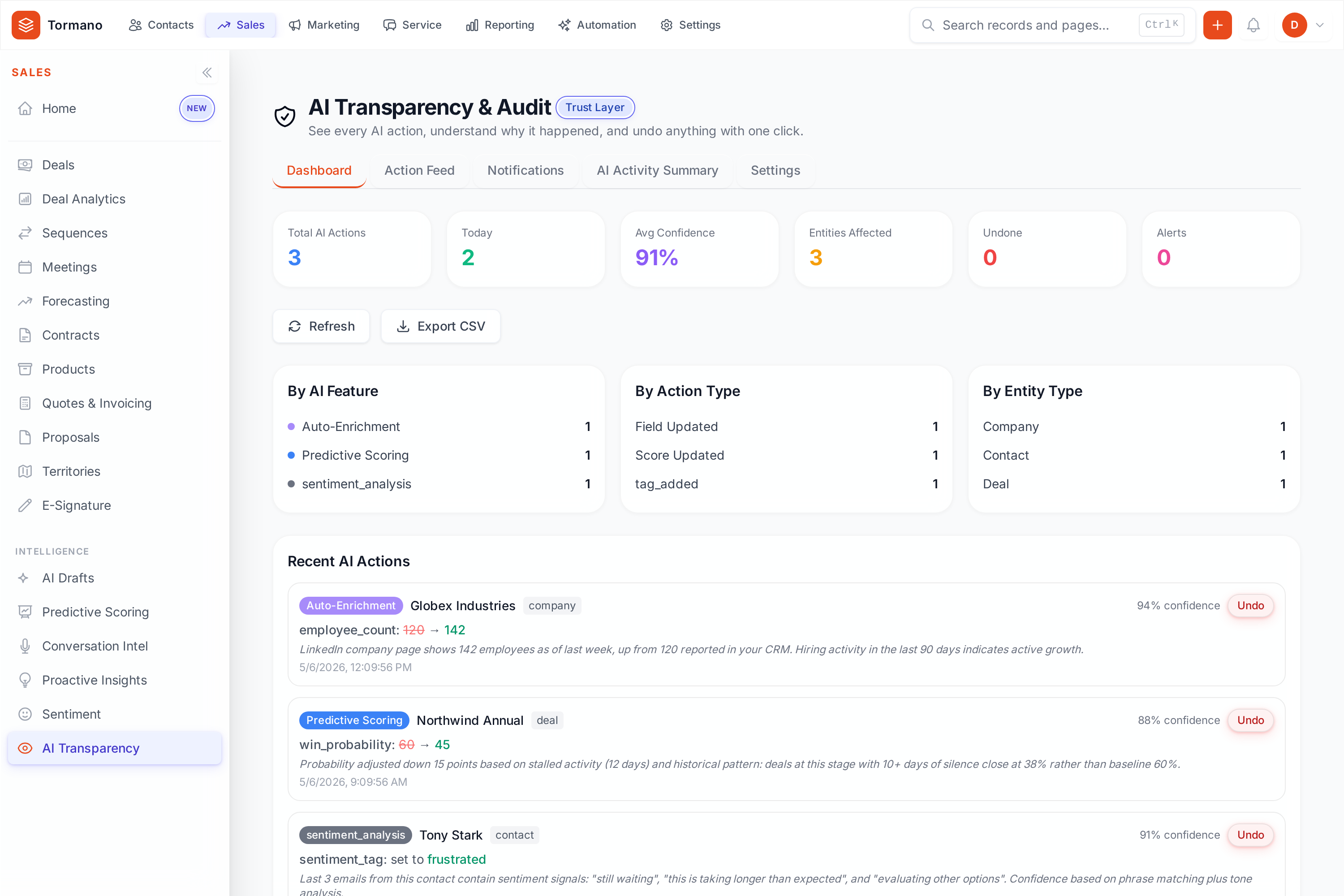
AI agents
Agents watch your records in the background and hand you something to act on.
Proactive insights
Insight agents watch for deal risk, churn signals, pipeline momentum, lapsing donors and missing follow-ups. Act on an insight, snooze it or dismiss it, and read the digest of what matters.
Email drafting
The email agent drafts follow-ups, replies, meeting recaps and thank-yous, either for you to approve or sent for you, and learns your tone from the drafts you keep.
Data cleaning
The cleaning agent finds duplicates, invalid emails and phone numbers, stale records and gaps, and proposes scored fixes you can apply in bulk.
Documents
Upload a scanned invoice or form and the details land on the right record, filed as the right kind of document, without anyone re-keying them.
Conversation intelligence
Meeting and video transcripts, and any notes you paste in, come back as topics, action items, objections and risk signals on the record.
Scoring and enrichment
Lead and donor scoring ranks who to work next, and enrichment fills in what your records are missing without a separate tool to connect.
Controls and availability
Throttles, quiet hours and approvals
Limit how often a workflow runs, silence notifications outside working hours, and require sign-off before a deal can advance a stage.
Fires in seconds, not overnight
A stage change launches its workflow within seconds. Date and schedule triggers are checked every 15 minutes.
QuickBooks in the loop
Create invoices, estimates and sales receipts from a workflow, on top of the standing two-way sync, so an automation ends in the ledger. Read how a closed deal becomes a reconciled invoice.
Sequences included
Multi-step email sequences that a workflow can enroll people into, with list actions and exits based on how they engage.
Built for businesses and nonprofits
Business workflows work in deals and stages. Nonprofit workflows work in donations, pledges and volunteer shifts.
Availability
Workflows are on every plan: 5, 50 or unlimited automations for businesses (Essentials, Growth, Business) and 5, 25 or unlimited for nonprofits (Starter, Standard, Professional). The full AI suite is on Business and Professional.
Three automations teams build first
The stalled-deal rescue
When a deal's stage has not changed for 14 days, the owner is notified, a follow-up task appears, and a re-engagement email drafts itself for approval.
The lapsing-donor nudge
When a donor starts to lapse, the fundraiser gets a task with the giving history attached, and a re-engagement email drafts itself for approval.
The won deal that invoices itself
When a deal is marked won, a QuickBooks invoice is created from it, the owner gets a task to confirm the terms, and the thank-you email goes out.
The thank-you that books itself
When a donation completes, the acknowledgment is sent, the tax receipt is issued and numbered, the sales receipt posts to QuickBooks, and the follow-up is scheduled.
The renewal that never slips
When a subscription nears renewal, the reminder sequence starts, the owner gets a task with the account's payment history, and the renewal invoice drafts itself.
The membership that renews itself
When a membership nears renewal, the reminder sequence starts, the coordinator gets a task with the member's giving history, and the renewal notice goes out.
More features: reporting and dashboards, the nonprofit suite, and the QuickBooks integration. Or compare Tormano with Salesforce and HubSpot.
Common questions
How quickly do triggers fire?
Event triggers fire within seconds: record and field changes, stage changes, email opens and clicks, and form submissions launch their workflows straight away. Date and schedule triggers are checked every 15 minutes.
What can an automation do in QuickBooks?
It can create an invoice, an estimate or a sales receipt, on top of the standing two-way sync. A workflow can take a won deal or a completed donation all the way to the ledger without anyone re-typing it.
What happens when the AI gets something wrong?
You undo it. Every AI change carries a one-click undo that restores the original, and agents can run in draft-only mode so nothing sends without your approval.
Can I test a workflow before turning it on?
Yes. Test mode runs the workflow against a sample record and shows you, step by step, what would run, what would be skipped and what still needs setting up. Nothing is sent or changed, and version history lets you roll back any save.
See it with your own data
Connect QuickBooks, import your records, and build your first workflow on day one.
14-day free trial. Every feature unlocked. No credit card required.